Last Updated v11.3.0
This screen is used as a communication tool between the employee, employer, and the TPA. Links, announcements, messages, and TPA transaction history can all be accessed from this screen.
Quick Links: Links to other web sites or documents. Supplied by HealthSmart and the Employer.
Announcements: Lookv1
The My Info page is the main hub in Web eXchange. Links, announcements, messages, and the main toolbar are available.
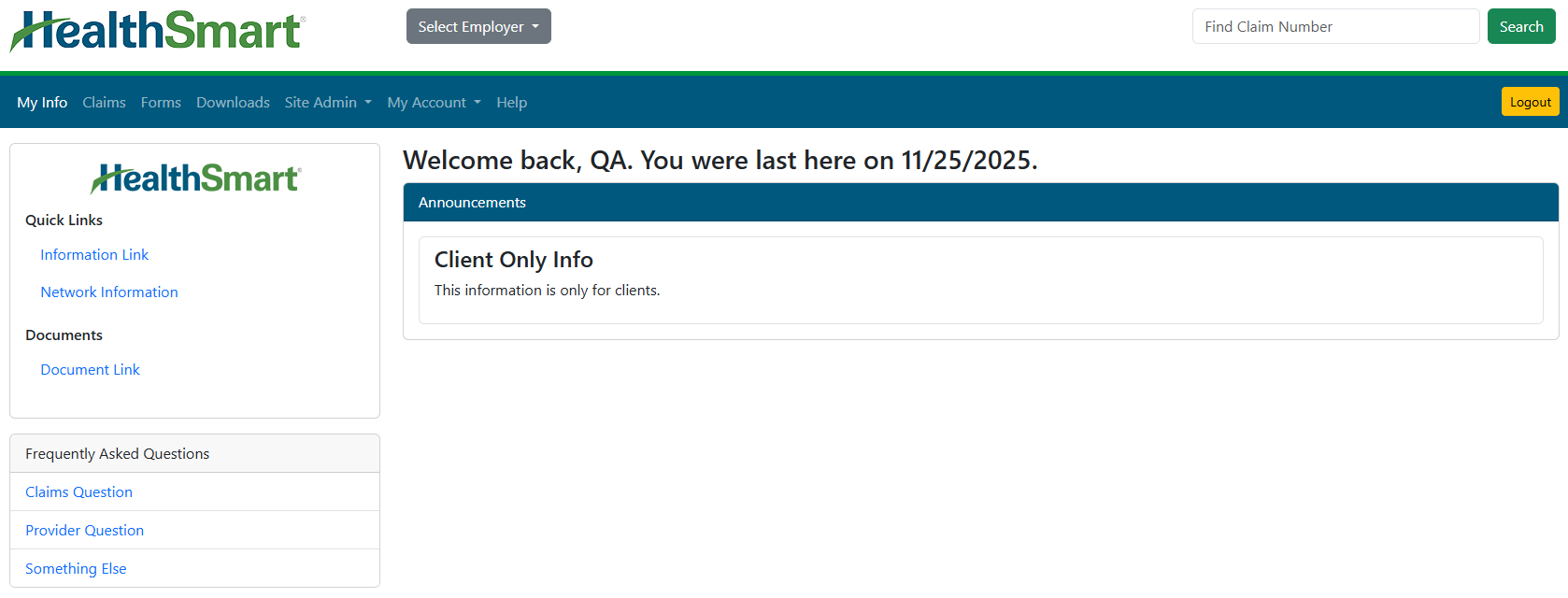
Left Link Bar
- Links - The left link bar can contains links to websites, information, and documents.
- Frequently Asked Questions - This section provides links to other forms, search screens, and information in Web eXchange.
- Some options will deliver you to the Claims search page. Find the claim(s) for which you wish to request information, select them, and use the Question option above the search grid.
- Some options will deliver you to the Forms page. Find the desired form or question options and follow the on screen instructions to complete the process.
Announcements
- Look for up to date information from HealthSmart
- Network Solutions. Click on the announcement body to read the full text of
- the announcement.
Menu Options

- Select client: If the account has access to multiple
- client numbers, this option can be used as a quick access between them.
- Find Claim Number: The quick claim search can be used to view claim detail for a specific claim number. Claims can also be accessed under the
- Claims menu option.
- My Info:
- This menu option will take you to the main home page in Web eXchange. See the Help topic “Info Center” for details.
- Claims: Access network claim information and status. See the Help topic
- “Claims” for details.
Questions: Send a question to Customer Service or Technical support. See the Help topic “Questions” for details.
Forms: Fill out online- Forms: Ask Questions, fill out web/online forms, or download-able forms
- (not all forms available for all plans). See
- the Help topic “Forms” for details.
- Downloads: The Downloads area allows the
- Client group to access documents that have been placed out for download to the
- Client. An example would be monthly reports. See the Help topic “Downloads” for details.
- Site Admin: A control panel for the
- Client to administer their portion of the Web eXchange system. See the Help topic “Site Admin” for details.
- My Account: Access your account settings to change your e-mail address or password.
- Help: Access this help guide.
- Logout: Exit the Web eXchange system, and return to the main login screen.