-
Created by
 Rob Ables on Mar 23, 2026
2 minute read
Rob Ables on Mar 23, 2026
2 minute read
Last Updated v1
Turnaround Time Report
The Turnaround Time report will pull summarized or detailed information into an Excel spreadsheet relating to the transaction selected in the parameters screen.
The transactions selected (based on the report parameters entered) will be for whichever version of the transaction was COMPLETED within the data range selected.
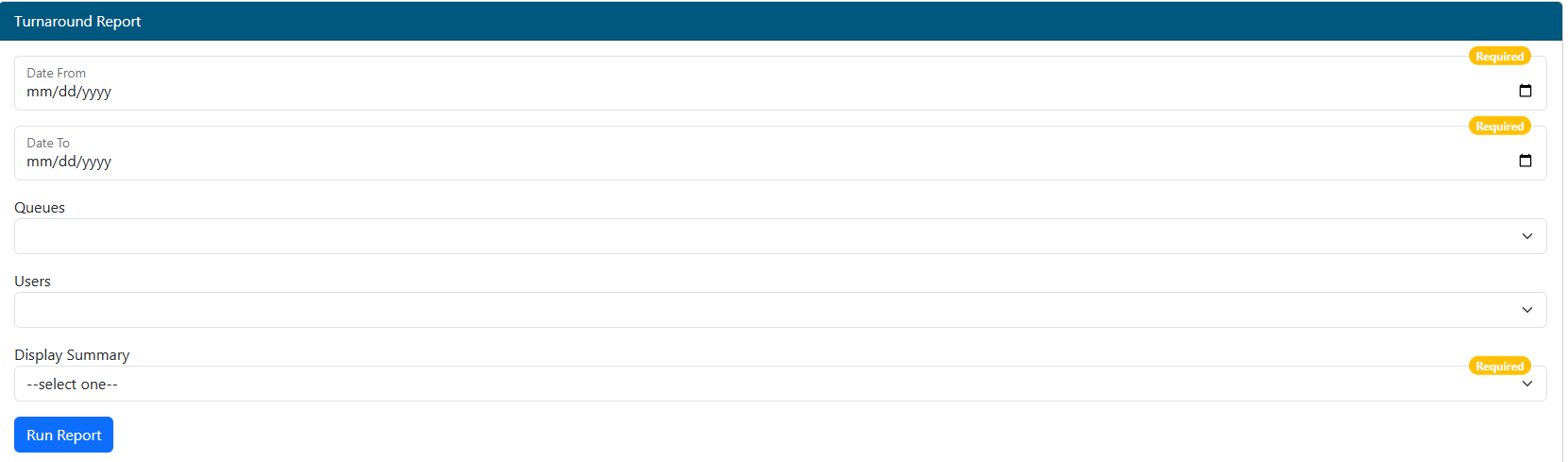
- Date From - Enter the starting date for the report. Transactions that we completed on or after this date will be included in the report.
- Date To - Enter the ending date for the report. Transactions that we completed on or before this date will be included in the report.
- Queues (optional) - Select the queue(s) that should be included in the report.
- Transactions that have been completed from these queue(s) will be included in the report
- If none are selected, the report will run for all queues.
- Users - Select the users(s) that should be included in the report.
- Only selected users that completed transactions will be included in the report
- If none are selected, the report will run for all users.
- Display Summary - Display summary or detail report version.
- Yes option (Summary): this will display totals and averages only, per user, per queue.
- It will also include user and report totals.
- No option (Detail): this will display transaction detail with one row per transaction, per user, per queue.
- It will also include user and report totals.
- Yes option (Summary): this will display totals and averages only, per user, per queue.