-
Created by
 Justin Musick, last updated by Rob Ables on May 01, 2026
3 minute read
Justin Musick, last updated by Rob Ables on May 01, 2026
3 minute read
Last Updated v1
This screen is used to track questions and forms which have been submitted. Every time a new question or form is filled out, a new transaction entry is created on this screen. Newer transactions are at the top of the list.
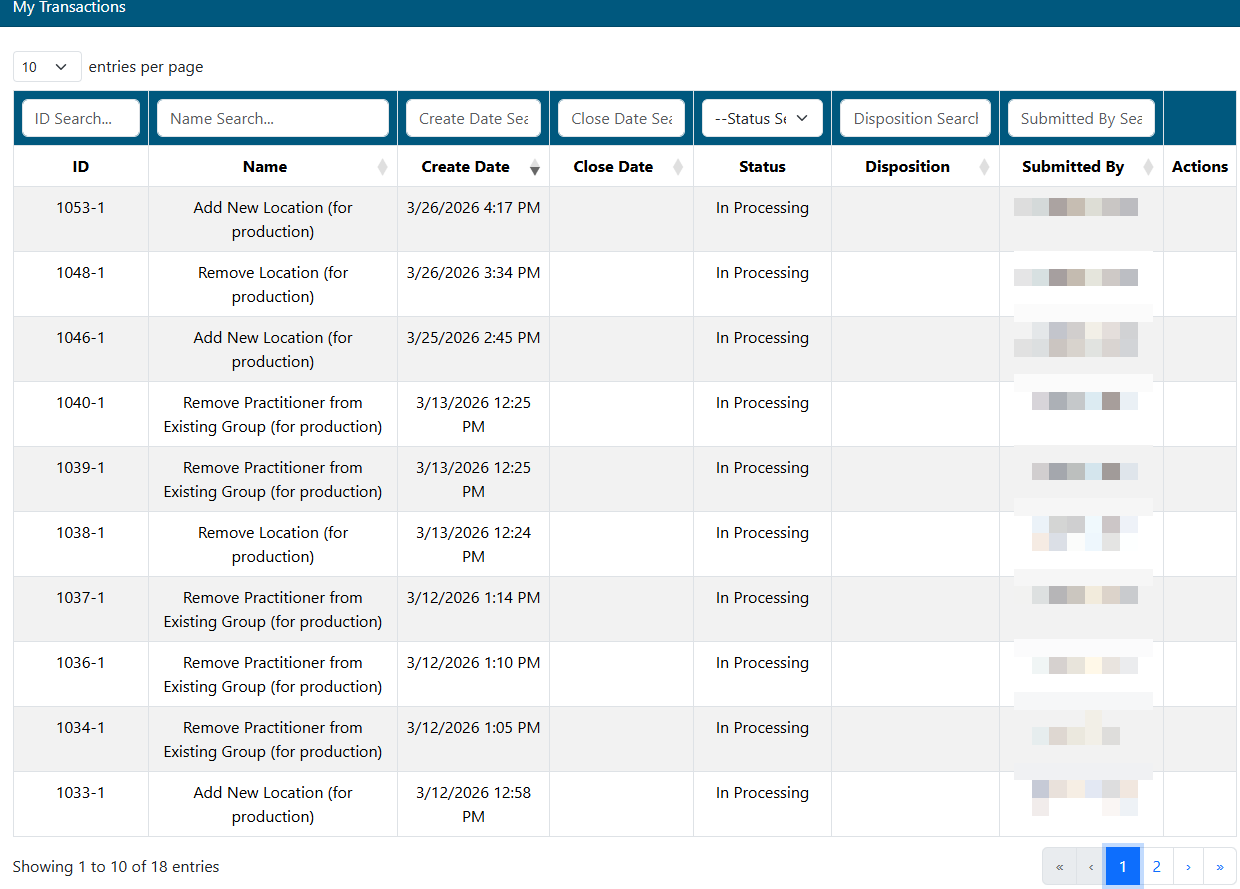
- Search/filter transactions in the list by entering criteria in any of the filter boxes above each column.
- Click any transaction to view more detail.
- ID - The transaction number is assigned when the transaction was first created. This number is unique to the transaction, and can be used as a reference number when communicating with the HealthSmart.
- Unread transactions are shown in bold text.
- Name - The name of the transaction/question/form.
- Create Date - Date the transaction was created.
- Close Date - Date the transaction was completed/closed.
- Status - Current status of the transaction.
- Disposition - This provides a description of how the transaction was handled.
- Submitted by - The name of the user that submitted the transaction.
- Actions - If the transaction was a Form, use the Copy to New Form option to create a new form with the original forms values pre-filled.
- Use this option to quickly fill forms that have similar information and only need minor updates before submitting the new form as a new transaction.
- ID - The transaction number is assigned when the transaction was first created. This number is unique to the transaction, and can be used as a reference number when communicating with the HealthSmart.
Possible Status Types
- In Processing - HealthSmart is reviewing and processing the transaction
- Needs More Info - HealthSmart needs more information to be able to process the request. Select the transaction by clicking on it. The notes from HealthSmart can be viewed on the transaction details, and a reply can be sent back to HealthSmart.
- Complete - HealthSmart has finished the request. More details about the transaction can be viewed by clicking on the desired transaction.
Transaction Detail
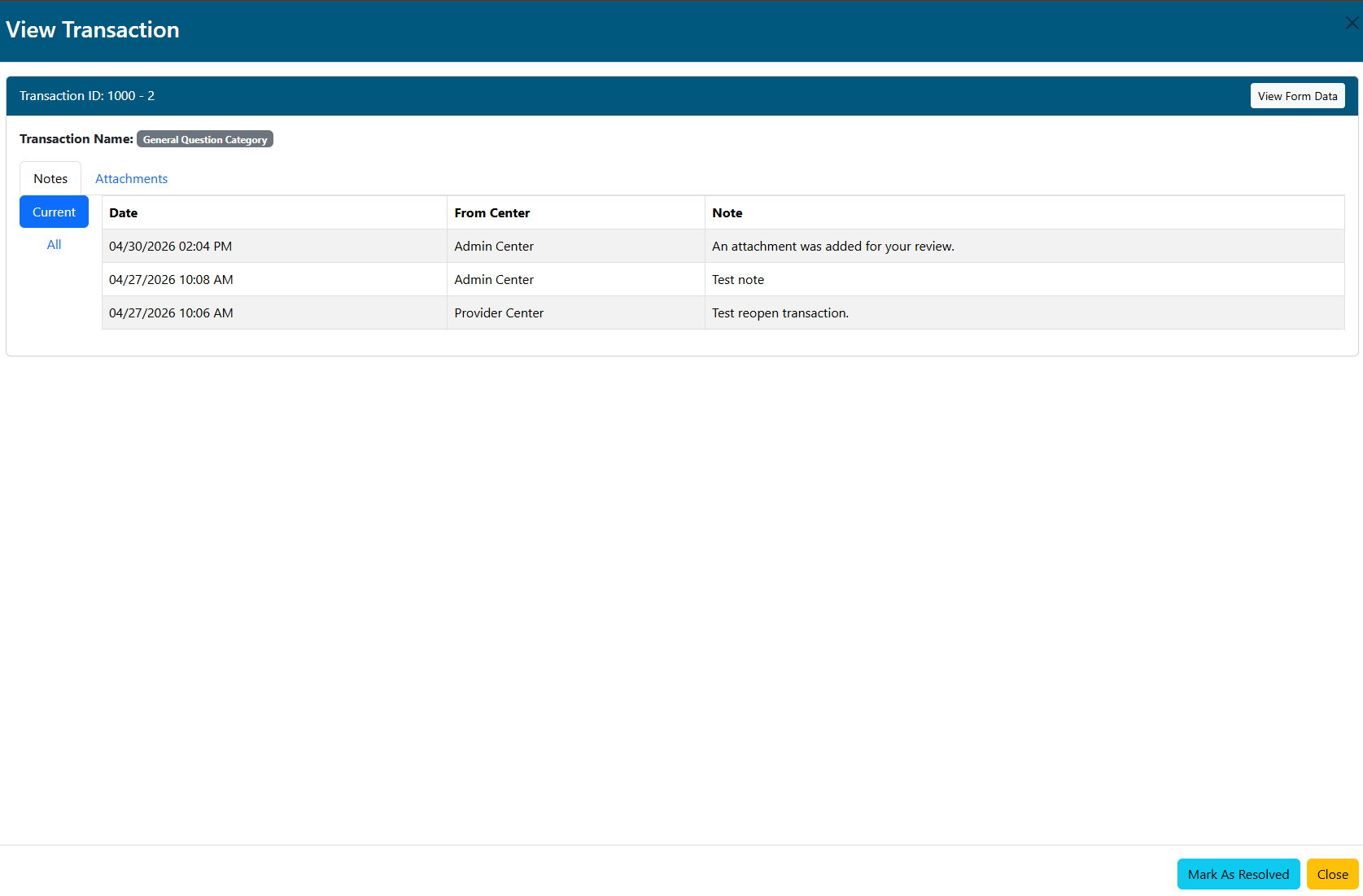
- The detail screen will show all information regarding the transaction.
- If the transaction was a Form submitted, click the VIEW FORM DATA button to review the original Form submitted.
- If more information needs to be sent on this transaction, click the REOPEN button, and fill out the form.
- When a closed transaction is reopened, the provider/practitioner will add notes/comments for HealthSmart Network Solutions. Attachments can also be added.
- If the transaction is not in a closed status, but it is no longer required (the issue has already been resolved), the Mark As Resolved button will be available to close the transaction.
- If the transaction was sent back to the provider/practitioner by HealthSmart Network Solutions for more information, the transaction will have the status "Needs More Info". Use the REPLY button to send the requested information. Attachments can also be added.
Notes Tab
Current: This are will show notes/comments added by HealthSmart Network Solutions in response to the request based on the current transaction iteration number. Each time a transaction is reopened with new information, a new iteration number will be added to the end of the main transaction number (-2, -3, etc.) It will also contain any responses from the provider/practitioner.
All: This are will show notes/comments added by HealthSmart Network Solutions in response to the request based on all transaction iteration numbers (a full history of notes/comments back to the original transaction submitted).
Attachments Tab
This area shows any attachments added by HealthSmart Network Solutions or from the provider/practitioner.
Claims Tab
If a claim question was submitted, this tab will be available and will show the claim(s) information.
Providers Tab
If a provider question/form was submitted, this tab will be available and will show the provider/practitioner information.