-
Created by
 Rob Ables, last updated on Dec 17, 2025
2 minute read
Rob Ables, last updated on Dec 17, 2025
2 minute read
Last Updated v1
Transaction Disposition Maintenance - This screen allows the Admin Center user to add/edit the transaction dispositions that are used when closing a transaction in a queue.
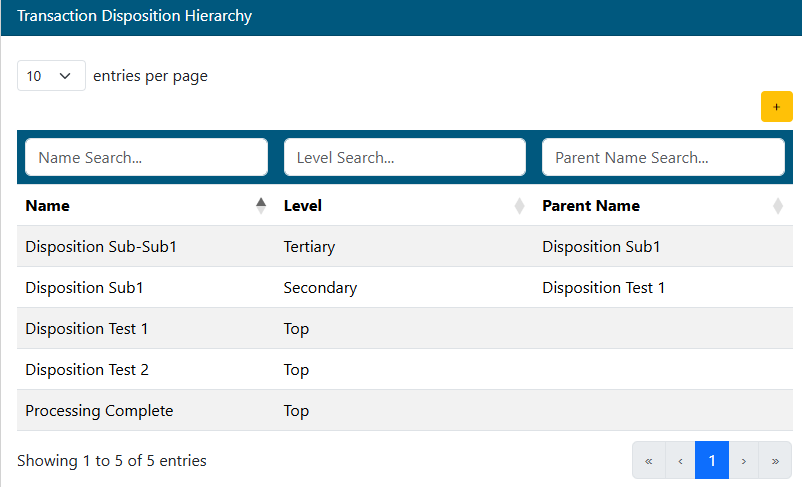
- Add a new disposition using the Add
 button on the top right section of the toolbar.
 - Search for an existing disposition to edit using the filters above each column.
- Click on the desired disposition in the list to edit.
Disposition detail
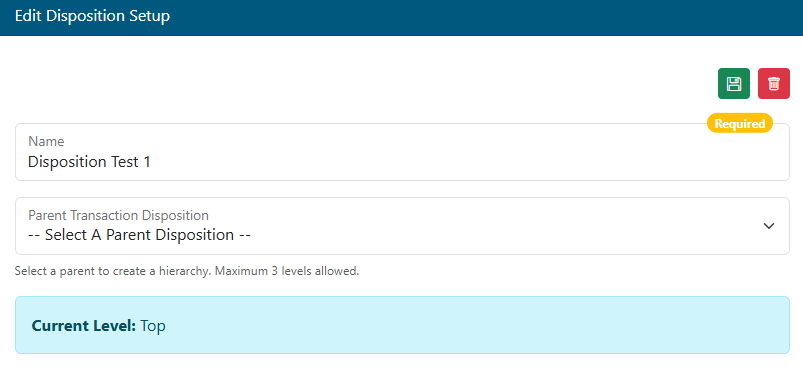
- Name - Add/Edit the name of the disposition.
- Parent Transaction Disposition (Optional) - Select an existing top or secondary level disposition to nest this disposition under.
- Records can go up to three levels deep. Top, Secondary, and Tertiary.
- Current Level - This shows the current nesting level of the record.
- When using a disposition to close a transaction in a queue, only the lowest level disposition can be selected.
- Example: if a Top level disposition has a secondary and a tertiary under the secondary, only the tertiary can be selected to close a transaction.
- When using a disposition to close a transaction in a queue, only the lowest level disposition can be selected.