-
Created by
 Rob Ables, last updated on Dec 08, 2025
2 minute read
Rob Ables, last updated on Dec 08, 2025
2 minute read
The My Info screen is the initial page that loads when logging into the Admin Center.
Last updated v1
From this page the user can see a welcome message, outstanding sign up request numbers, available queues, and transaction and claim lookup boxes.
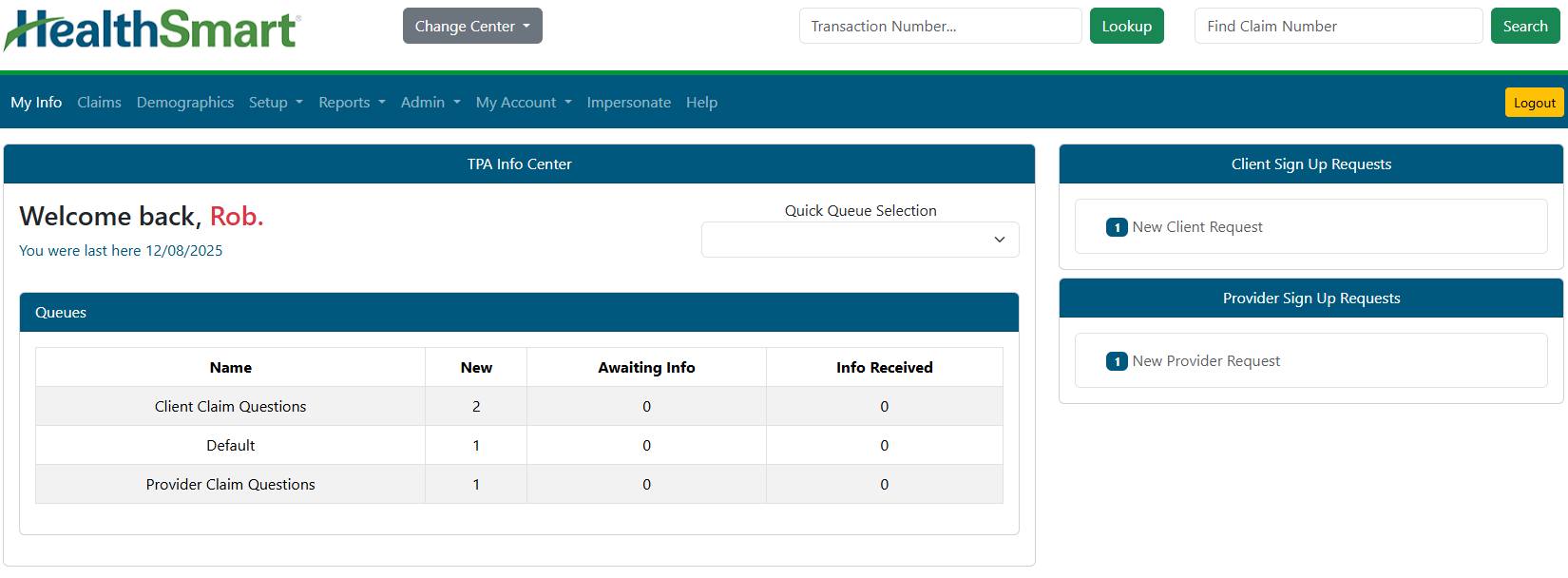
- Change Center (If available) - If your Web eXchange account has access to multiple centers (Admin and Client, for example), you can change between those centers using this option without logging in and out for each.
- Transaction Lookup - Enter a Web eXchange transaction number in the lookup box to jump directly to that transaction detail.
- Find Claim Number - Enter an HRP system claim number in the lookup box to jump directly to that claim detail.
- Logout - Use this option to sign out of the Admin Center.
- Quick Queue Selection - Use this list to access any queue (if access allows) and go directly to the queue. This is helpful if you need to access the Transaction History tab in a queue, but the queue is not visible in the normal Queues list because it has no current transactions.
- Queues (if access allows) - A list of queues will display containing transactions to be worked. Queue access is granted by your supervisor. See the Queues section of this documentation for more information.
- Sign up Requests (if access allows) - Click the link under each grouping to go directly to the sign up request for review. These options are also available under MY ACCOUNT menu option.